Minecraft block and item renderer, from a URL
One GET returns a transparent PNG of any of the 1,102 blocks or 1,473 items in Minecraft 26.2, isometric like the inventory, at any size up to 1024 pixels. No key, no signup.

Two endpoints
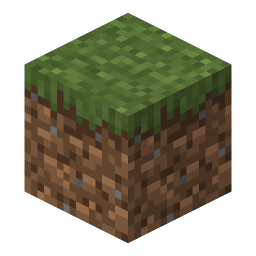
Blocks are rasterised from the game's own JSON models, in the isometric view the inventory uses. Items are their sprite, scaled with nearest-neighbour so the pixels stay square. An item the game draws as a block — a grass block in your hand — comes out isometric, the way it does in the inventory.

Blocks
1,102 of them, every one with its own page.
https://blockrender.dev/render/block/diamond_block.png?size=512
Items
1,473 sprites, crisp at any size.
https://blockrender.dev/render/item/diamond_sword.png?size=512Every block, every item
Each one has a page with the render, downloads at five sizes, the raw textures it is built from and its colours. Start at the block catalogue or the item catalogue.


What the API does
The inventory look
45° round and 30° down, with the game's own face shading — top full brightness, north and south
0.8, east and west 0.6. Or set yaw and
pitch yourself.
Crisp at any size
Textures are sampled nearest-neighbour, so a 1024 px render is sixteen big square pixels per texel, not a blurry upscale. Anti-aliasing applies to the block's silhouette only.
Biome tints
Grass, leaves and water are grey textures the game multiplies by a biome colour. Renders default
to plains; biome=swamp or an outright
tint= changes it.
Transparent by default
No background unless you ask for one, and crop=true trims the empty edges. Drop it straight into a card, a GUI or a thumbnail.
A JSON catalogue
/api/blocks and
/api/items list every id with its name and
category; /api/block/<id> adds the model, the
textures and the dominant colours.
Cheap to use
Deterministic renders, strong ETags and a memory cache: a repeated URL is a 304 with no body, and a first render is a few milliseconds.
Guides and reference
Frequently asked questions
Do I need an API key?
No. There is no key, no signup and no client library to install. The URL is the whole interface, and the same URL always returns the same PNG.
Which Minecraft version do the renders come from?
Java Edition 26.2. The version is pinned rather than followed, because a silent bump would change images other people have already linked.
Can I use these images on my site or in my plugin?
The renders are made from Mojang’s textures, so the same rules apply as to a screenshot or a wiki image: fine for fan sites, wikis, plugin pages, Discord bots and videos, not for anything that passes itself off as an official Minecraft product. Whole texture packs are deliberately not offered — see About.
Why is my block rendered facing that way?
A block has many states and only one can be the picture of it. Block renders use the resting state: no rotation, nothing powered, nothing connected — the same one the wiki shows. Blocks and items explains the choice.
Is there a rate limit?
No published one. Renders are cached in memory and answered with an ETag, so a repeat request costs a 304 and nothing else. Please cache on your side too rather than rendering the same URL in a loop.